🎉 The full demo runs in your browser · no sign-up · a fictional restaurant ready to tap Try it →
Ready in 0 minThe demo opens in your browser, no sign-up
฿0 rentNo monthly plan
1,003 testsAutomated, before every release
3 languagesไทย · English · 한국어
Pick your symptom

Where does your restaurant hurt?

Tap a problem and see what the system serves for it — each one is several features working together.

One dish at a time

Old problem, new fix, real screens

Each set says what it fixes, with which features, and where to try it in the demo.

01 The rush-hour set

However full the house, the kitchen knows what to cook first

The problemAt peak, staff run paper tickets to the kitchen. Tickets get lost, handwriting is unreadable, and cooks work in the order they pick tickets up, not the order guests have waited — so the longest-waiting table is forgotten.

In this set

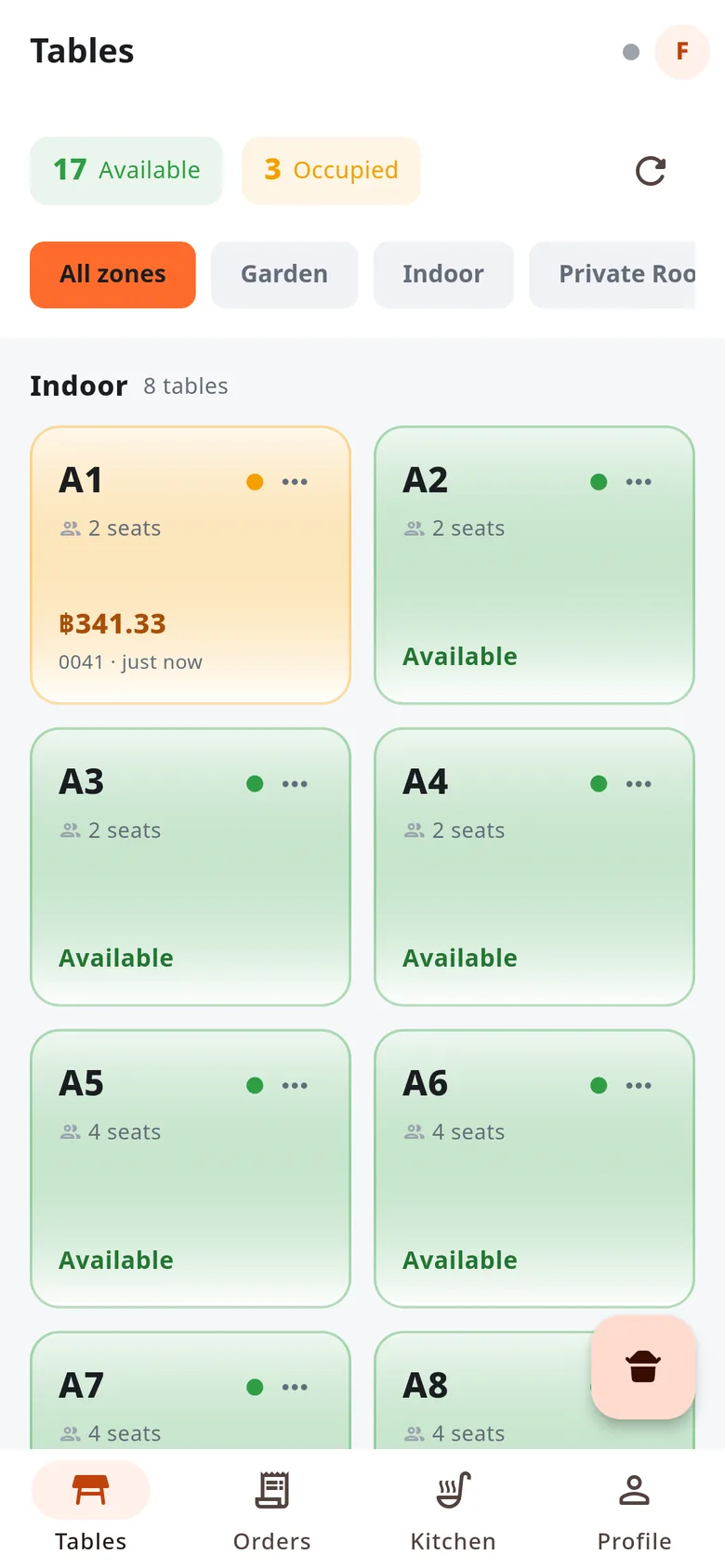
  • A colour-coded table mapFree, seated, the running bill on each table, grouped by indoor and window zones.
  • Orders with options and notesMedium spicy, fried egg, no vegetables — it reaches the kitchen complete, no shouting.
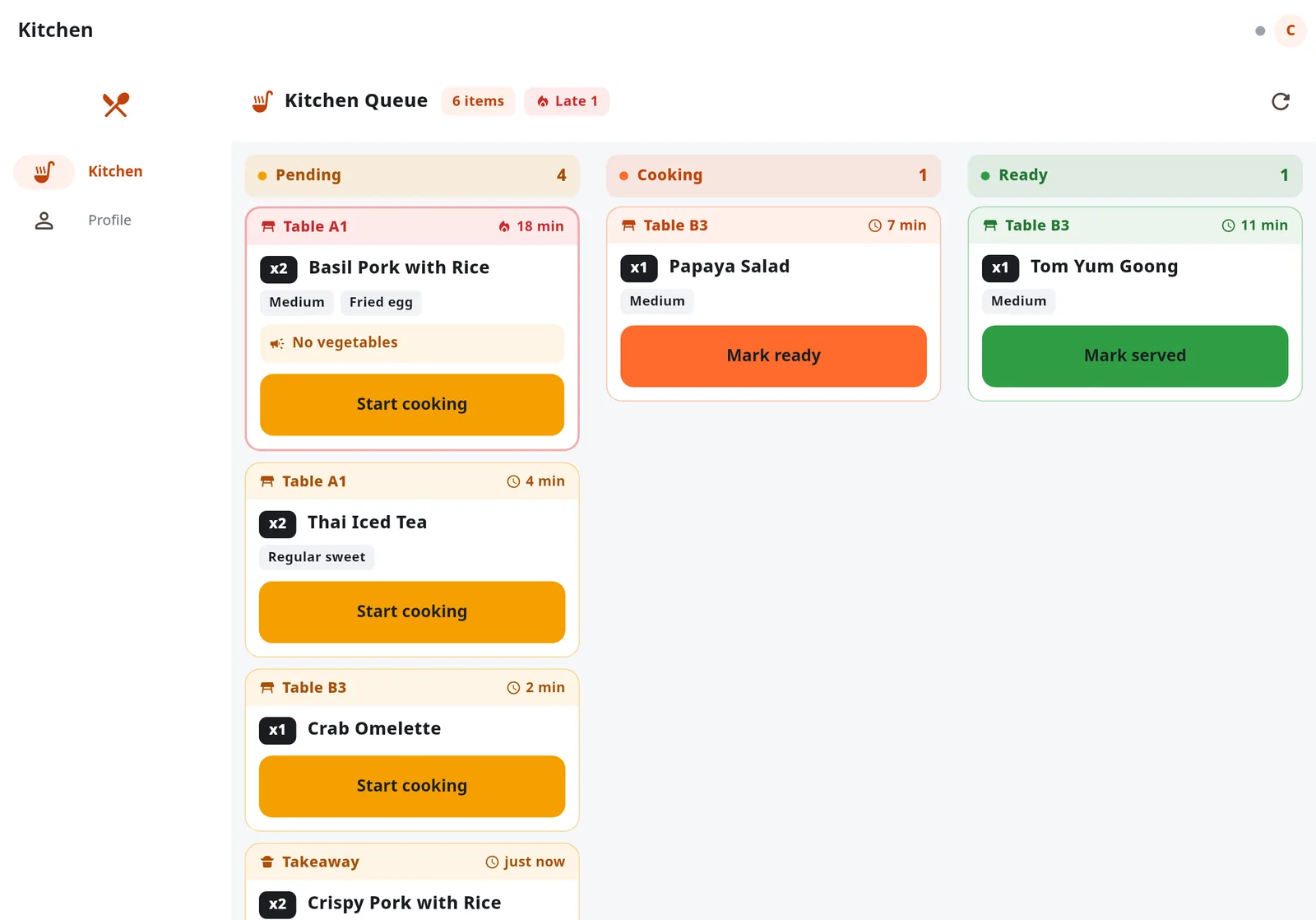
  • A live three-column kitchen screenTo cook → cooking → ready. The oldest ticket is on top, and anything past 15 minutes turns red by itself.
  • Dine-in, takeaway and delivery iconsTakeaway orders get a daily queue number automatically.
  • Undo a wrong tapAn "Undo" bar for 8 seconds after each status change, no manager needed.

✓ The longest wait is always on top

Taste it in the demo
  1. Open the demo and choose "Waiter"
  2. Tap a free table, pick dishes and send them to the kitchen
  3. Sign out and choose "Kitchen" — the new ticket is in the "to cook" column
Open the demo →
Kitchen screen on a tablet: the table A1 ticket has waited 18 minutes and is flagged red
Kitchen screen: tickets past 15 minutes warn by themselves
Table map on a waiter's phone, free tables separate from seated ones
Table map on a waiter's phone

02 The self-order set

Guests order from their own phones, staff do the work that needs a person

The problemBig restaurants are short of waiters almost every shift. Guests wait for a menu, for someone to take the order, for someone to add more — and every minute of waiting is a table turning slower.

In this set

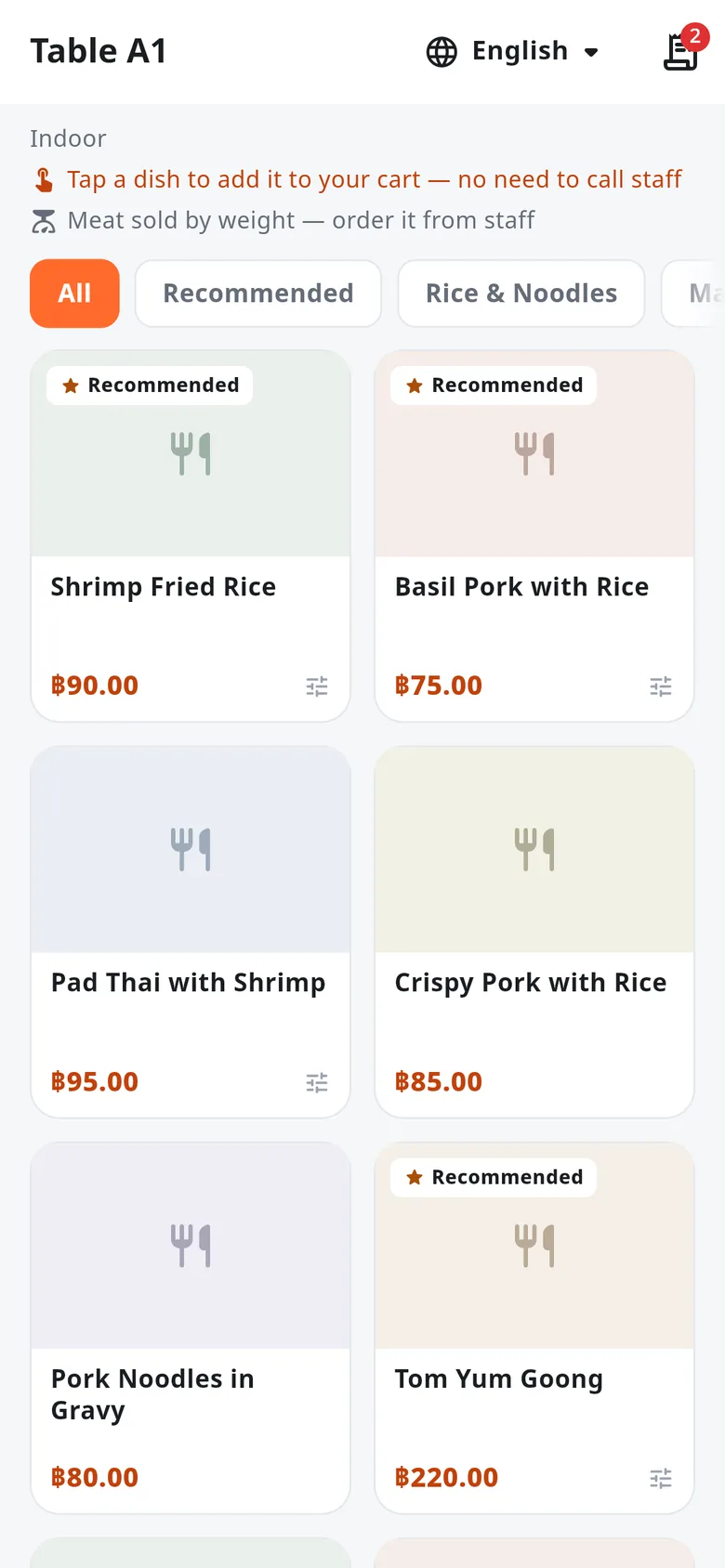
  • Scan the table QR and orderOpens in the phone browser. No app to install, no sign-up or login.
  • The same path as a staff orderReaches the kitchen screen and deducts ingredient stock exactly the same way. No second system to reconcile.
  • Guests see their table's orderAdd more at any time and see what has been ordered so far.
  • Broken links say soA wrong QR or a deactivated table tells the guest it cannot be used. No stray orders reach the kitchen.
  • Managers can replace a QRLong-press a table on the map to show its QR, copy the link, or issue a new QR in place of the old one.

✓ Guests order the moment they sit down
Taste it in the demo
  1. Open the demo, choose "Manager" and go to Tables
  2. Long-press any table → "View self-order QR" → "Copy link"
  3. Open the link in a new tab and order as a guest
Open the demo →
The menu a guest sees on their phone after scanning table A1's QR
What guests see after scanning the QR

03 The fast-bill set

Scan to pay the real total, and split a whole table in a few taps

The problemThe cashier types the transfer amount by hand — one wrong digit and someone chases a refund. Friends want to pay their own share, and discounts and service charge get divided at the counter.

In this set

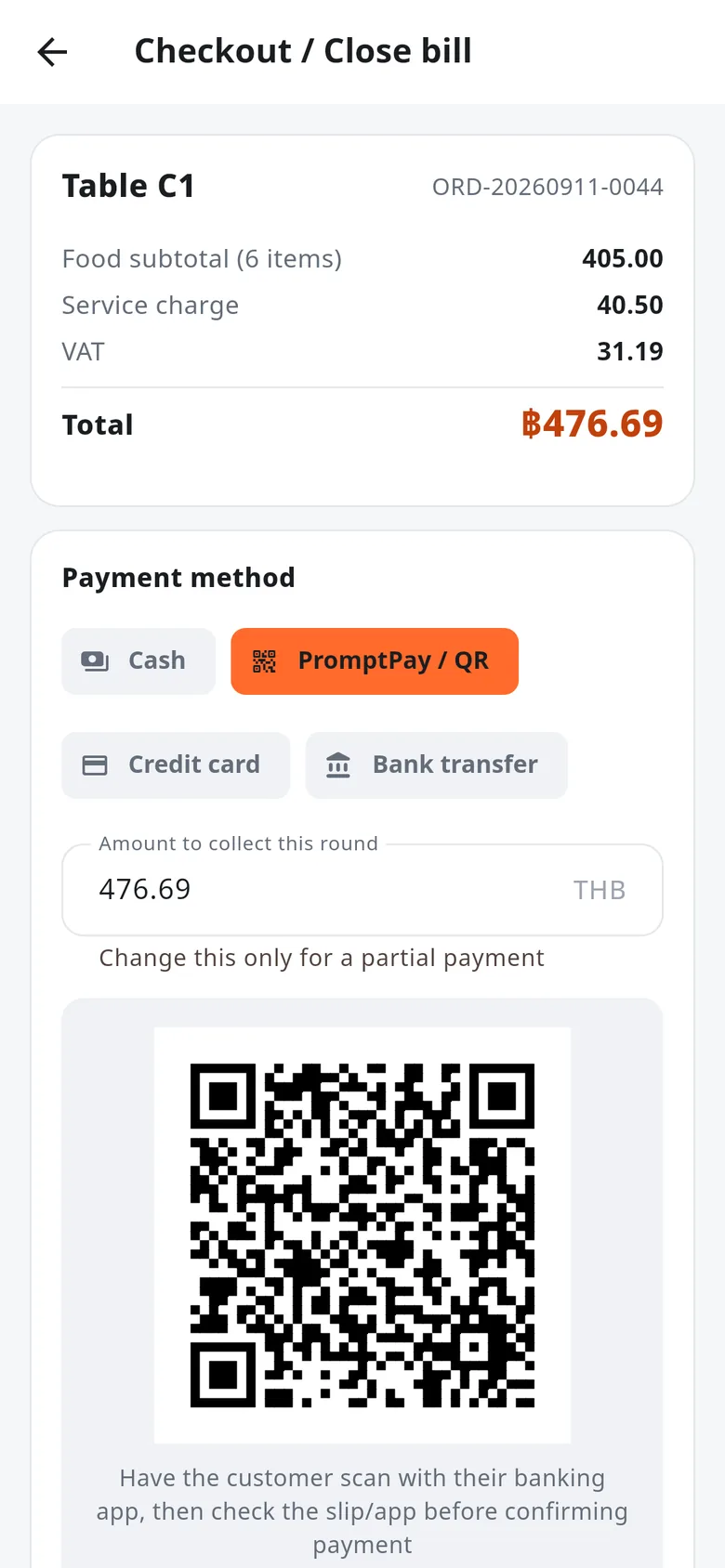
  • PromptPay QR to the EMV standardThe bill total is inside the QR. Guests scan with any banking app, nobody types an amount.
  • Split by payment method or by itemCash, QR and card on one bill, with discount, service charge and VAT shared out proportionally.
  • Move and merge tablesWhen guests change seats or join tables, their orders follow.
  • Thai receipts on thermal printersESC/POS on 58 mm and 80 mm paper, over the same LAN or Wi-Fi.
  • Abbreviated tax invoicesNumbered by the Thai Buddhist-era year, voidable while keeping the history.

✓ The QR matches the bill to the satang

Taste it in the demo
  1. Open the demo and choose "Cashier"
  2. Tap a seated table and take payment
  3. Choose "PromptPay / QR" — the QR is built from that bill at once
Open the demo →
Checkout on a phone with PromptPay selected, showing a QR for table C1's total
A PromptPay QR for the bill total

04 The honest-drawer set

Every baht in the drawer traces back to where it came from and who touched it

The problemBills voided after payment, discounts beyond someone's authority, refunds with no reason. In a big restaurant many hands touch the cash, and when the total is off there is no evidence of what happened.

In this set

  • No payment without an open shiftStarting float on opening; every payment is tied to the open shift.
  • Instant reconciliation at closeCount the cash; the system works out what should be there and the difference.
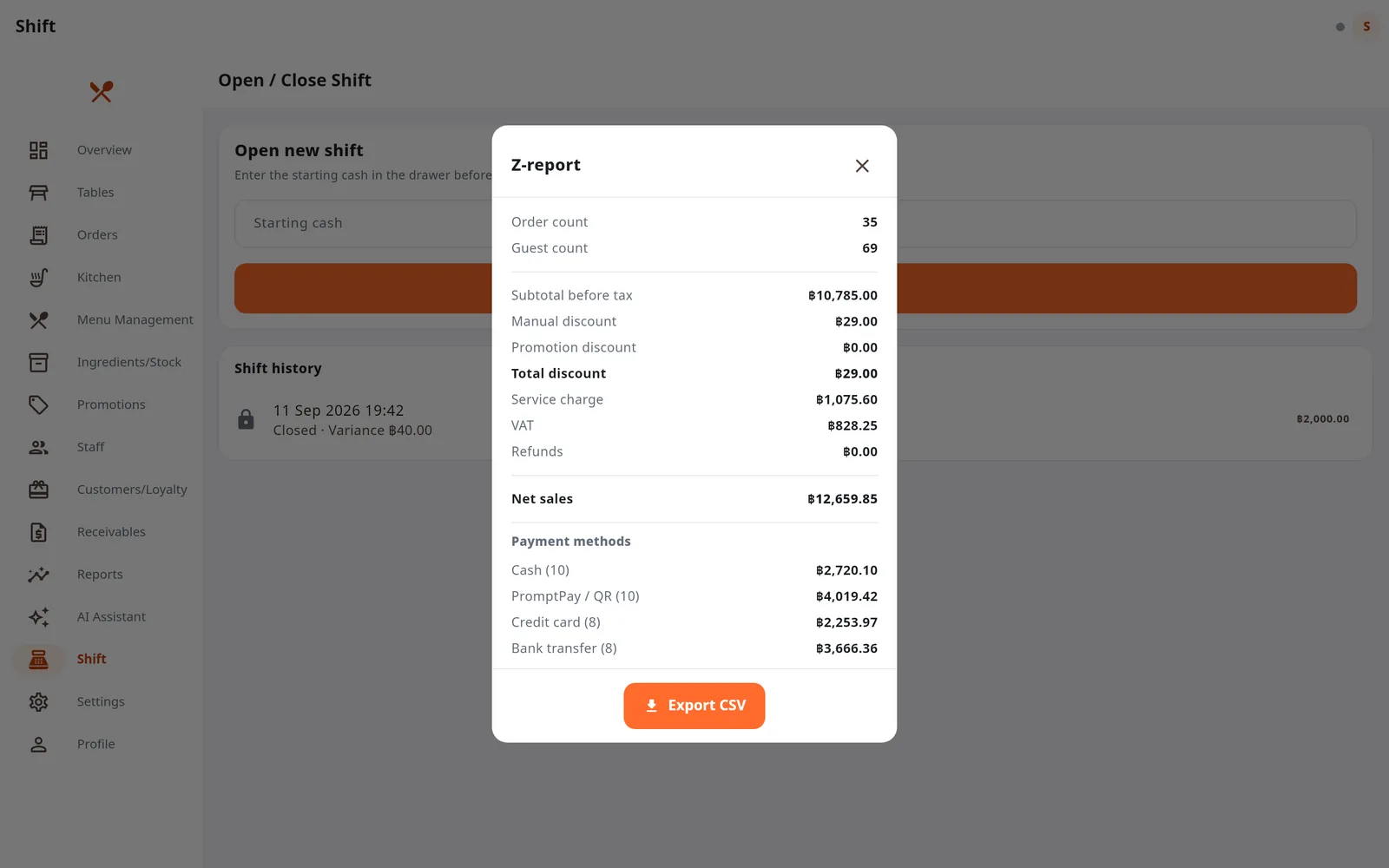
  • Z-report per shift and per daySales, tax, manual discounts apart from promotions, payment methods, debt collected. Export CSV for accounting.
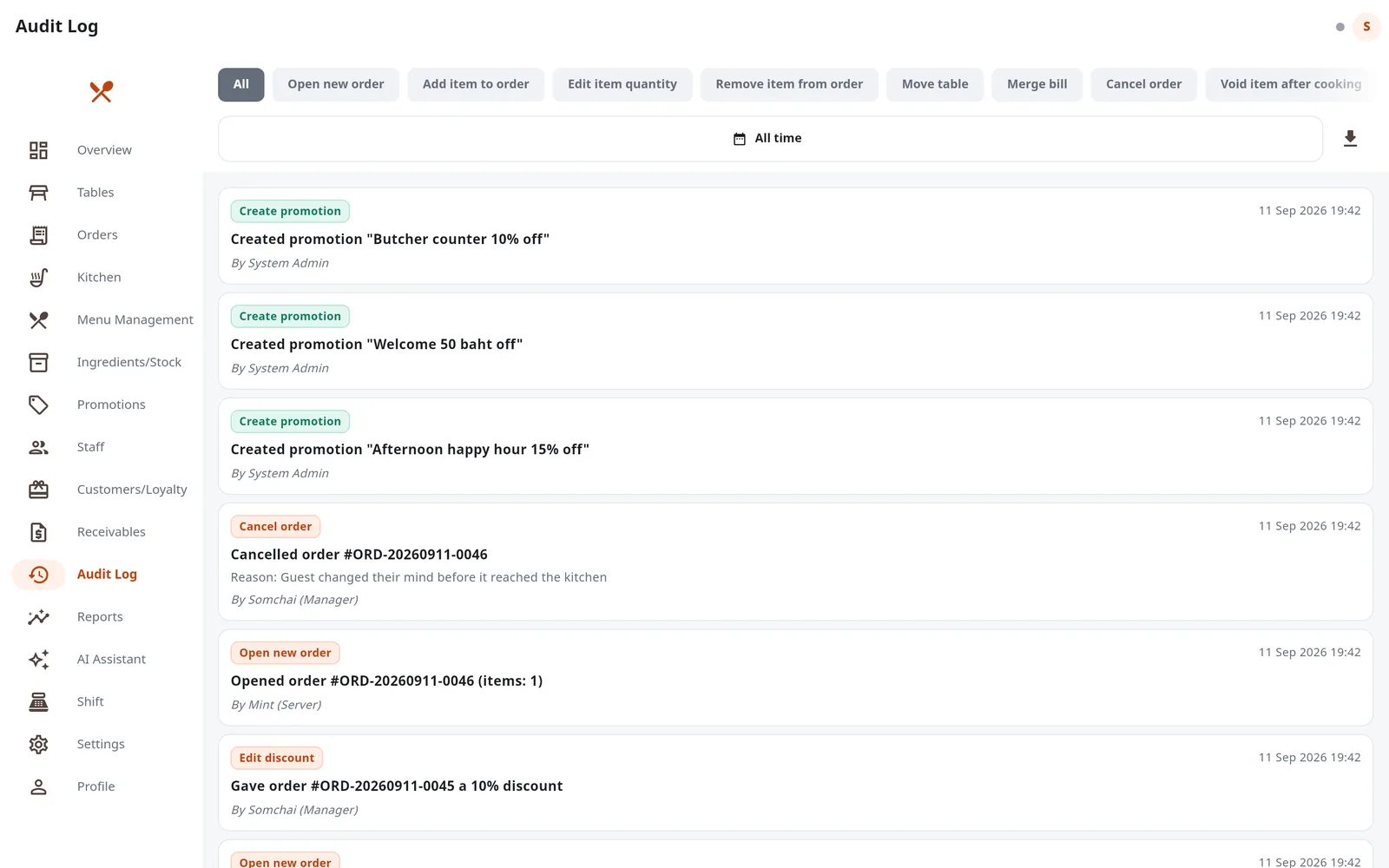
  • A history nobody can editVoids, discounts, refunds, price edits and permission changes, with who, when and why — every time.
  • Five roles, enforced on the serverNot just hidden buttons: a direct request is refused too.

✓ Even 40 baht short shows at shift close
Taste it in the demo
  1. Open the demo, choose "Manager" and open "Shift"
  2. Press "Close shift" and enter a count a little short, then tap that shift in the history to see its Z-report
  3. Sign in again as "Admin" → "Audit Log"
Open the demo →
The shift Z-report with sales, discounts, payment methods and the cash difference
The Z-report of a shift counted 40 baht short
The audit log showing who did what and when, with type filters
Audit log: who did what, and when

05 The never-run-out set

When an ingredient runs out, the dish stops selling before anyone orders it

The problemThe fish ran out at 8 pm but the dish is still on sale. Staff take three orders before the kitchen says so — wasted time and disappointed guests.

In this set

  • Dishes linked to ingredientsStock is deducted when a dish goes to the kitchen and returned on a void or removal, in the units the kitchen counts in.
  • Sold out means off saleWhen an ingredient is short, its dishes stop selling at once and come back after a restock.
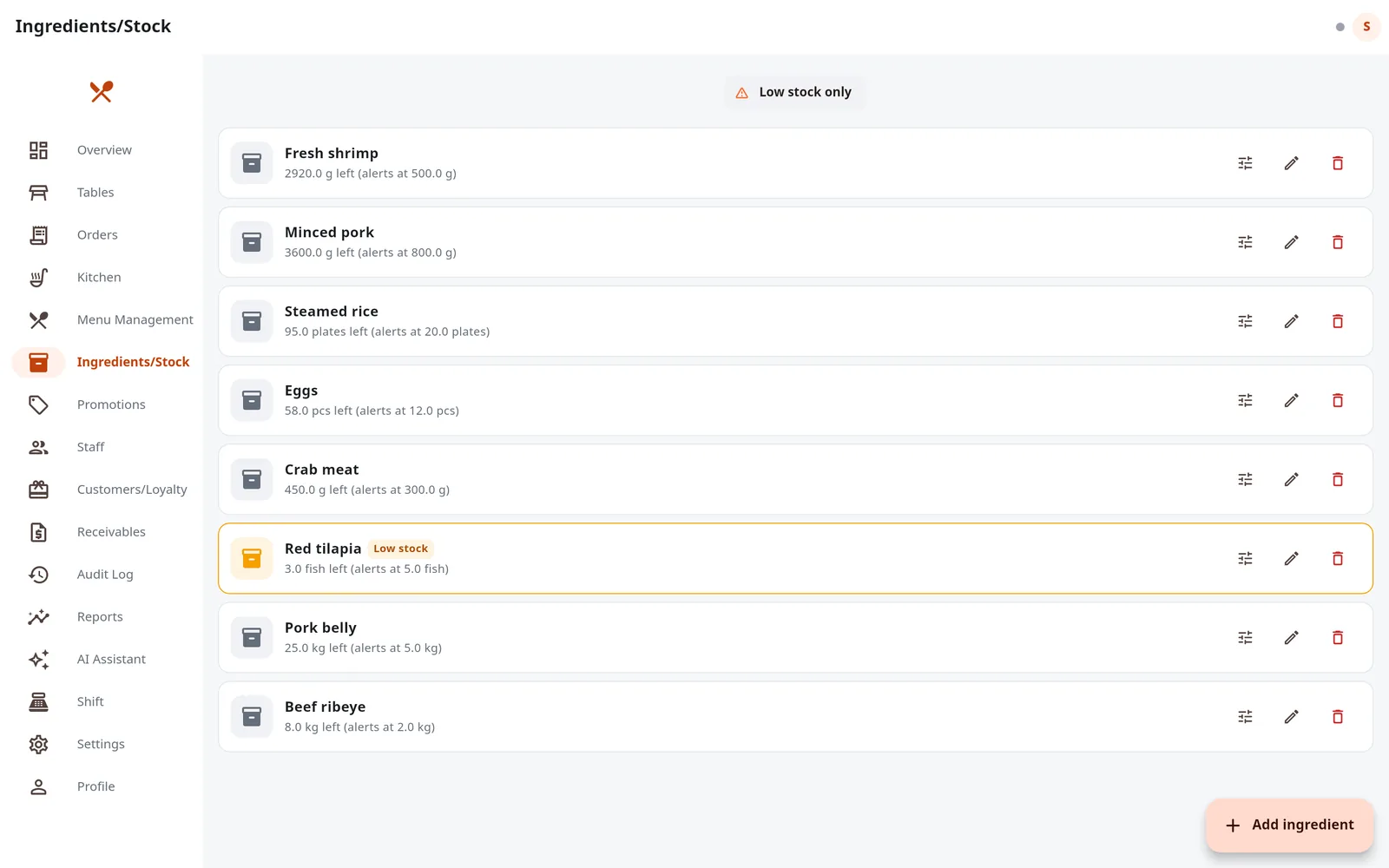
  • Low-stock alertsA threshold per ingredient, and a filter for only what is running low before you open.
  • Works with QR self-order tooGuest orders deduct stock along the same path.

✓ Nobody has to switch dishes off by hand
Taste it in the demo
  1. Open the demo, choose "Admin" → "Ingredients/Stock"
  2. Press "Low stock only" — red tilapia is already set below its threshold
  3. Set the tilapia stock to zero and watch the dish that uses it go off sale
Open the demo →
Ingredients/Stock with red tilapia highlighted as low stock
Low-stock ingredients are highlighted first

06 The butcher-counter + wholesale set

Weigh, sell, bill and collect — in the same system as the floor

The problemWeights are written by hand and priced on a calculator. Wholesale debts live in a notebook, and when it is time to chase them nobody knows which bill is how many days overdue.

In this set

  • Sell by weight, read live from the scalePrice per kilo. A scale connected to the shop server sends the weight to the screen, or type it; see the price before it goes in the cart.
  • Scan scale labels and barcodesUSB or Bluetooth scanners, or the phone camera. EAN-13 labels carry item and weight together; a misread is flagged, never guessed.
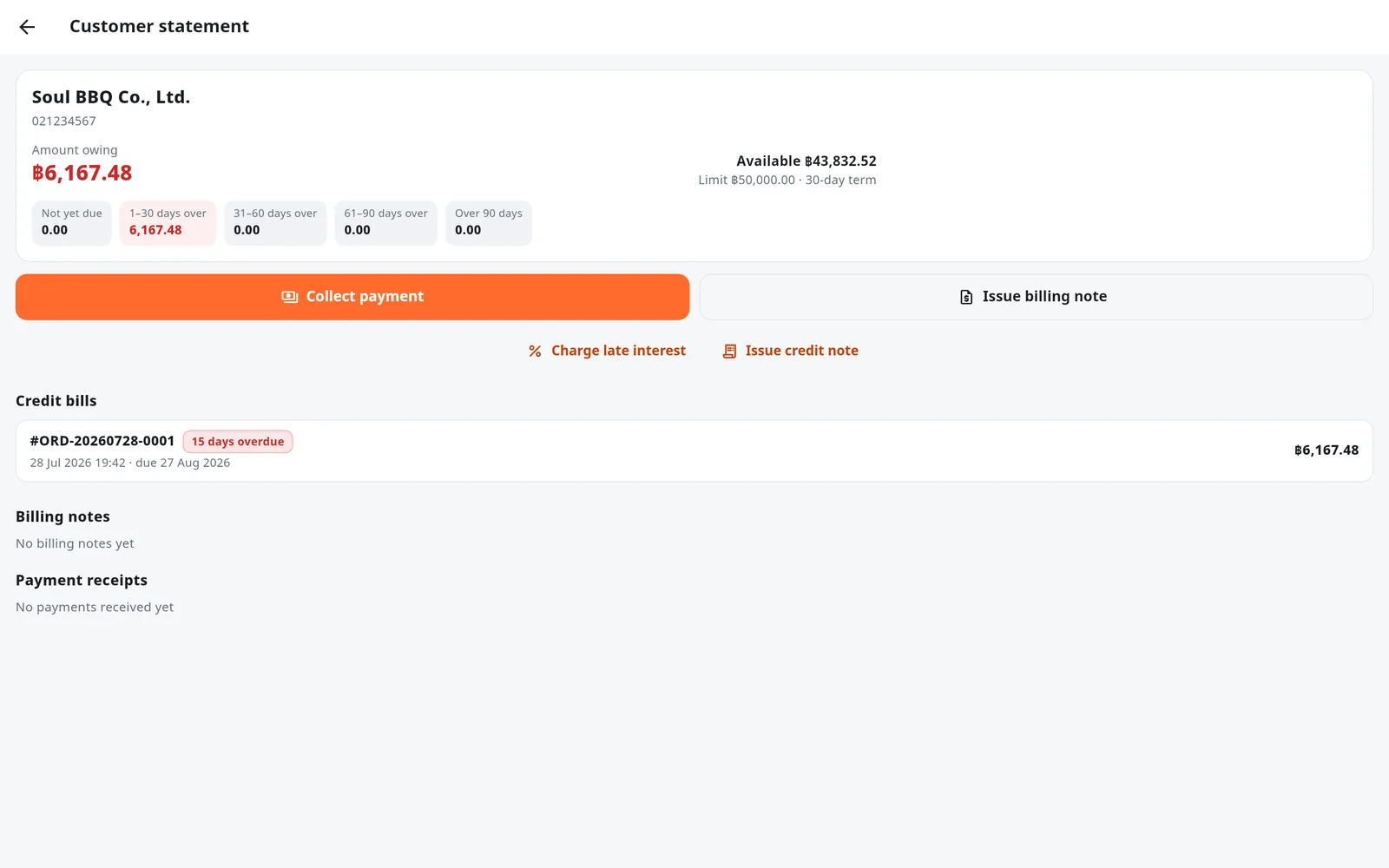
  • Credit within a limit and a termOver the limit cannot be charged. Aged balances, billing notes, and payments that settle the oldest bill first.
  • Late fees and credit notes as Thai PDFsAmounts in words, Buddhist-era dates, and email to the customer directly.
  • Debt collected reconciles with the drawerThe Z-report shows debt collected apart from the day's sales.

✓ 0.485 kg × ฿1,200 = ฿582, no calculator

Taste it in the demo
  1. Open the demo, choose "Cashier" → "New takeaway/delivery" → Fresh Meat & Take-home
  2. Tap Beef Ribeye — the simulated scale sends a weight to the screen
  3. Sign in as "Manager" → "Receivables" → the wholesale customer Soul BBQ Co., Ltd.
Open the demo →
A label from a label-printing scale. The barcode really scans off the screen, or type 2000101012504 into the demo’s scan box.
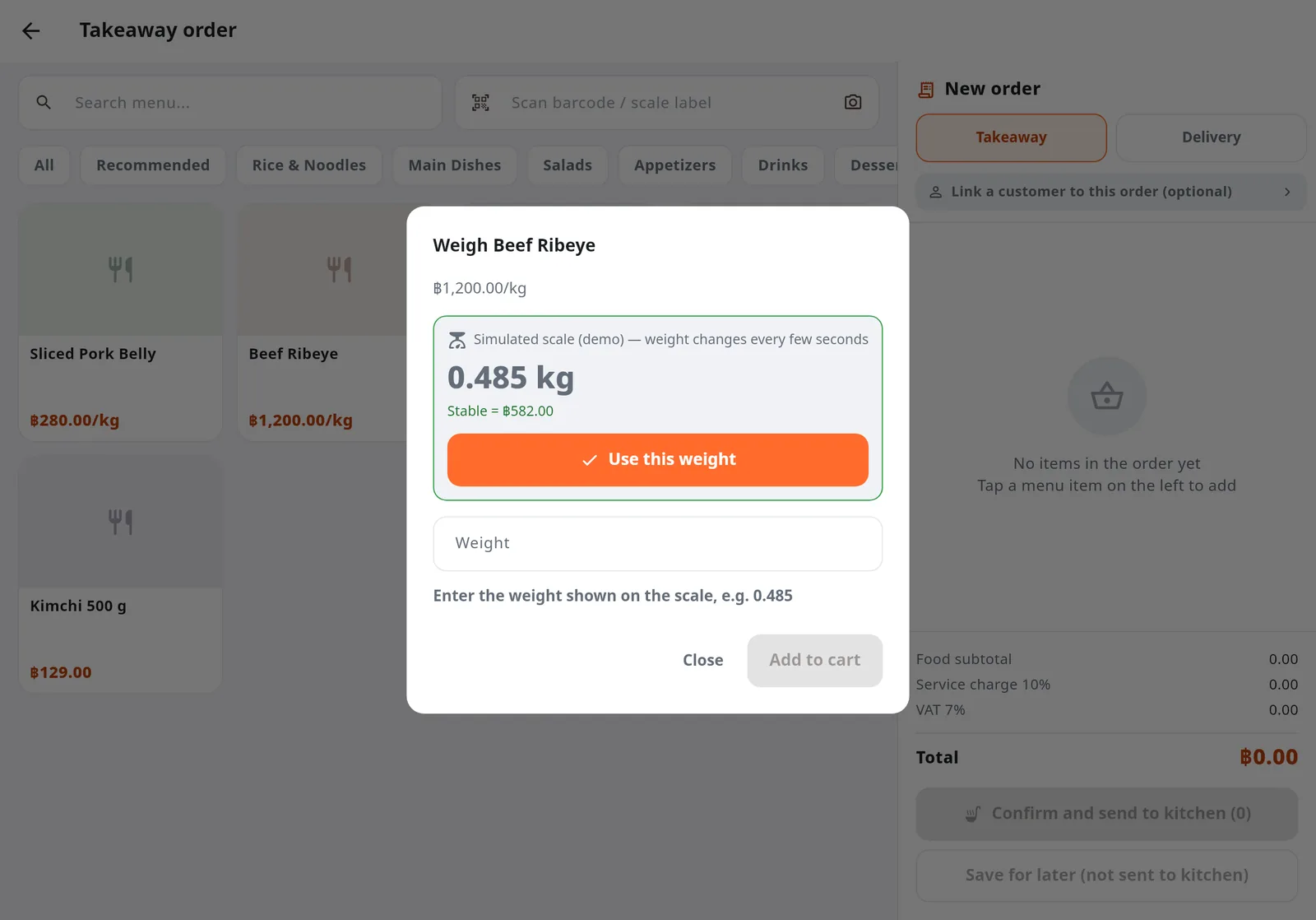
Weighing beef ribeye: 0.485 kg read from the scale, priced at 582 baht
The weight box reads the scale live
A wholesale customer statement with balances aged by due date and overdue bills
Receivables aged by due date

07 The live-numbers set

Today's sales, the busy hours and how people pay — while the doors are still open

The problemOwners of big restaurants decide about people and stock every day, but the numbers arrive after closing, or wait on a summary from each branch.

In this set

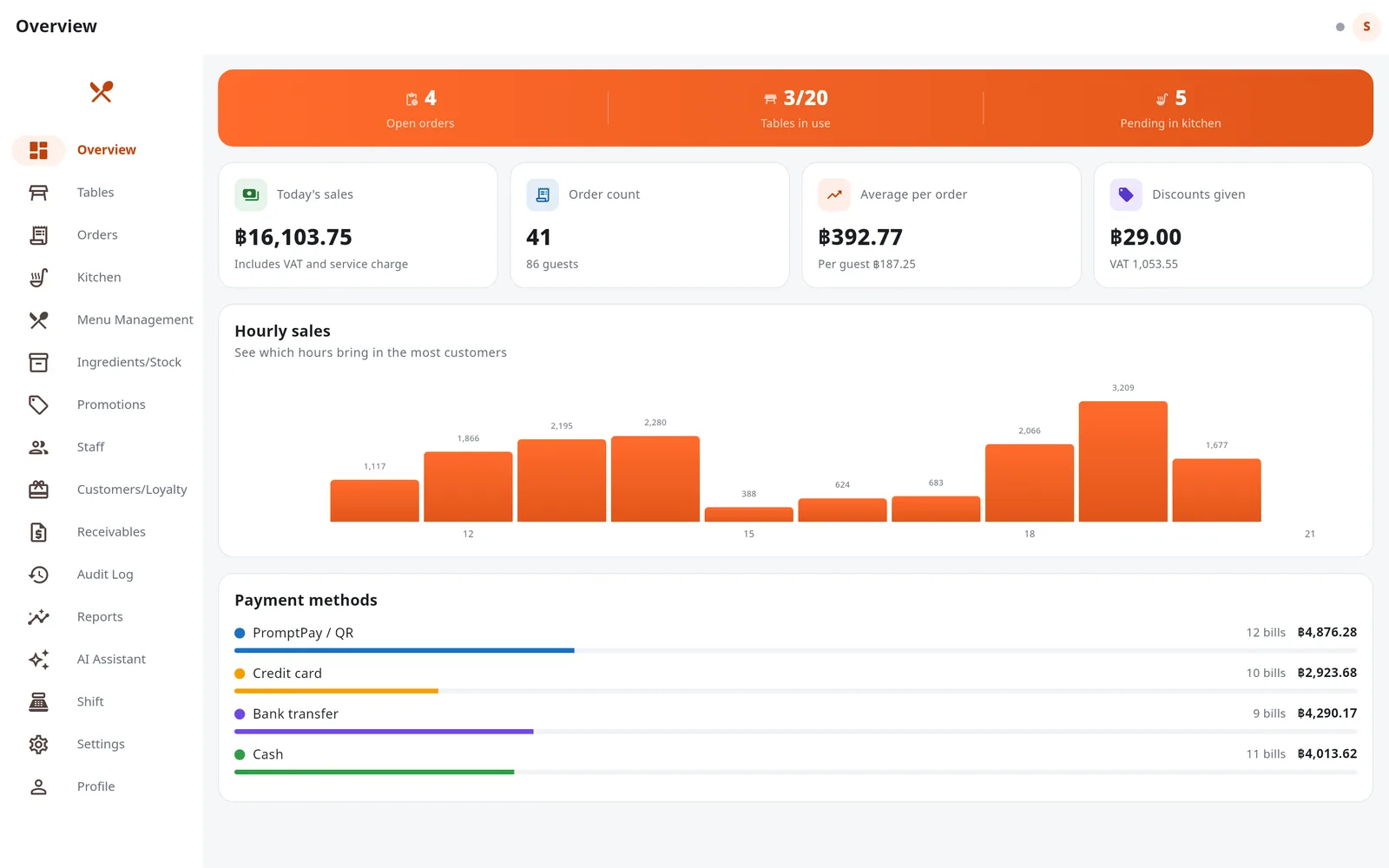
  • A live dashboardSales, bill count, average bill, discounts, an hourly chart and the payment-method split.
  • History reports + CSVBest sellers, daily and per-category sales. CSV exports open in Excel with Thai intact.
  • Many branches in one systemTables, menus, orders, stock and reports per branch; admins can see all branches together (the web demo has one branch).
  • Ask in a sentenceThe AI assistant answers from the shop's real data — see the next section.

✓ Know the day while it is happening

Taste it in the demo
  1. Open the demo and choose "Admin" — the first screen is the Overview
  2. Go to "Reports", pick a date range and export a CSV
Open the demo →
Overview dashboard with today's sales, an hourly chart and the payment-method split
Today's dashboard, live while you sell

08 The promotions + loyalty set

Set a promotion once and every bill is matched; regulars collect points by themselves

The problemAn afternoon happy hour, a welcome code, buy-one-get-one on some dishes — and when the floor is busy staff forget a discount or apply the wrong one.

In this set

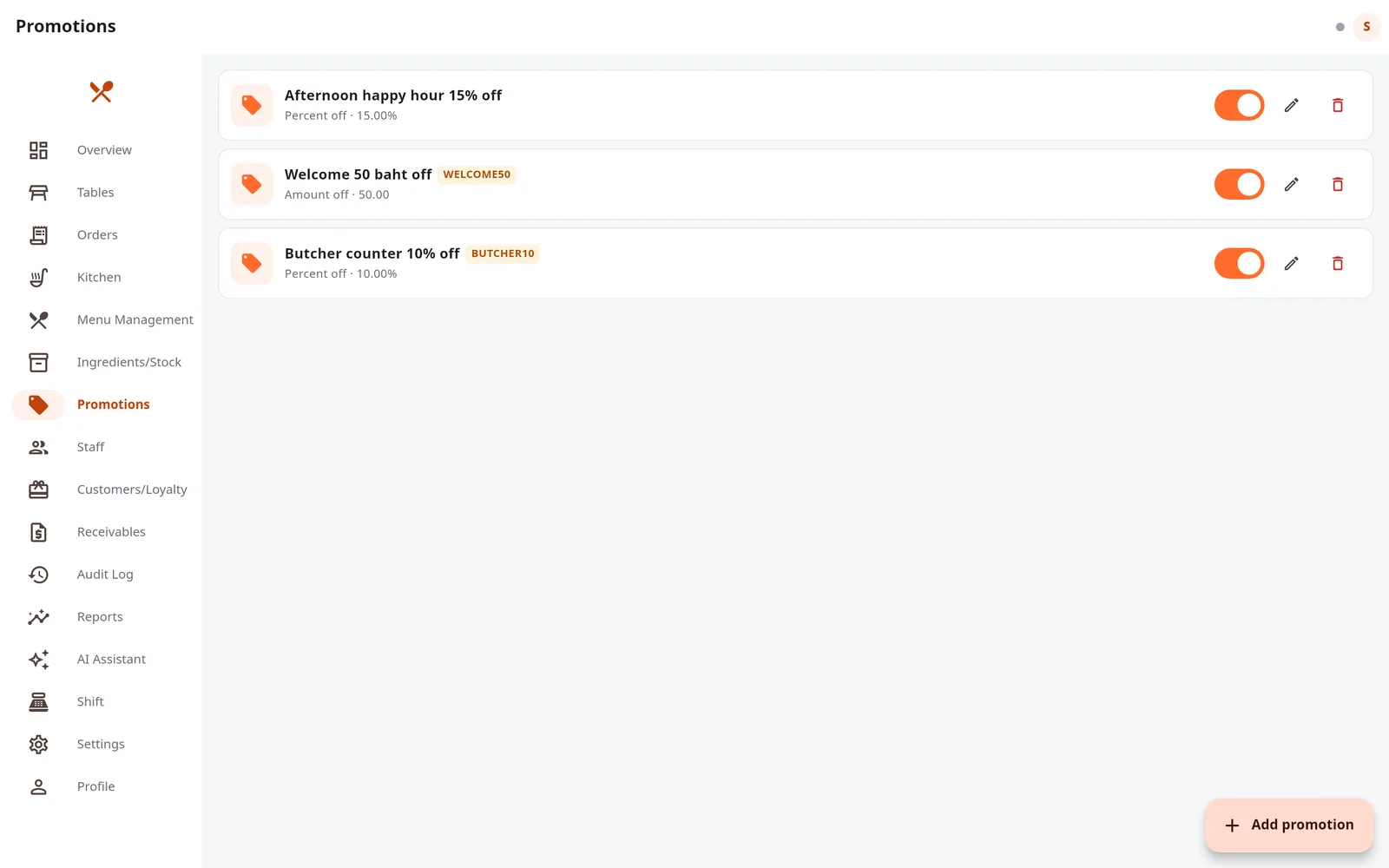
  • Conditional promotionsDays and hours, categories or dishes, a minimum spend, discount codes, buy one get one — matched to qualifying bills automatically.
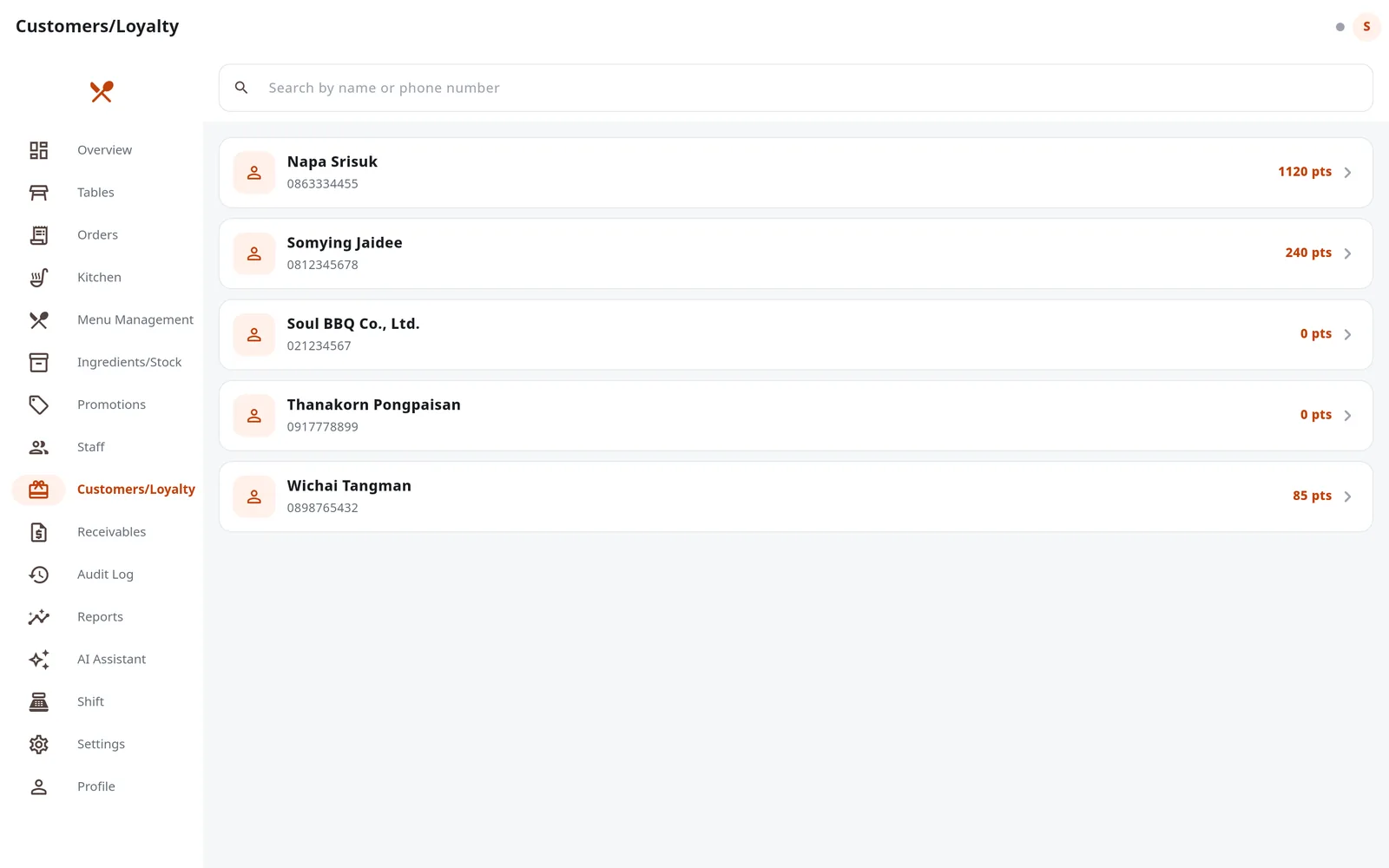
  • Automatic loyalty pointsFind the guest by name or phone when taking the order; points by spend, redeemed as a discount at payment.
  • Purchase history per guestWhat your regulars order and how often they come.
  • Every promotion change is tracedCreating, editing and switching off promotions is recorded in the audit log.

✓ Staff never memorise a promotion

Taste it in the demo
  1. Open the demo, choose "Admin" → "Promotions" → add a promotion
  2. Cover the current time, then open a new bill — the discount appears by itself
  3. See each guest's points under "Customers/Loyalty"
Open the demo →
Three promotions: an afternoon happy hour, a welcome code and a weekend code
Three kinds of promotion
Customer list with each guest's loyalty points
Customers and their points

09 The real-floor set

Designed for the real floor, not a clean screen in a meeting room

The problemScreens look good in an air-conditioned office. The real floor has sun on the glass, steam, a hand holding a wok, Wi-Fi dropping mid-service and staff who do not read Thai fluently.

In this set

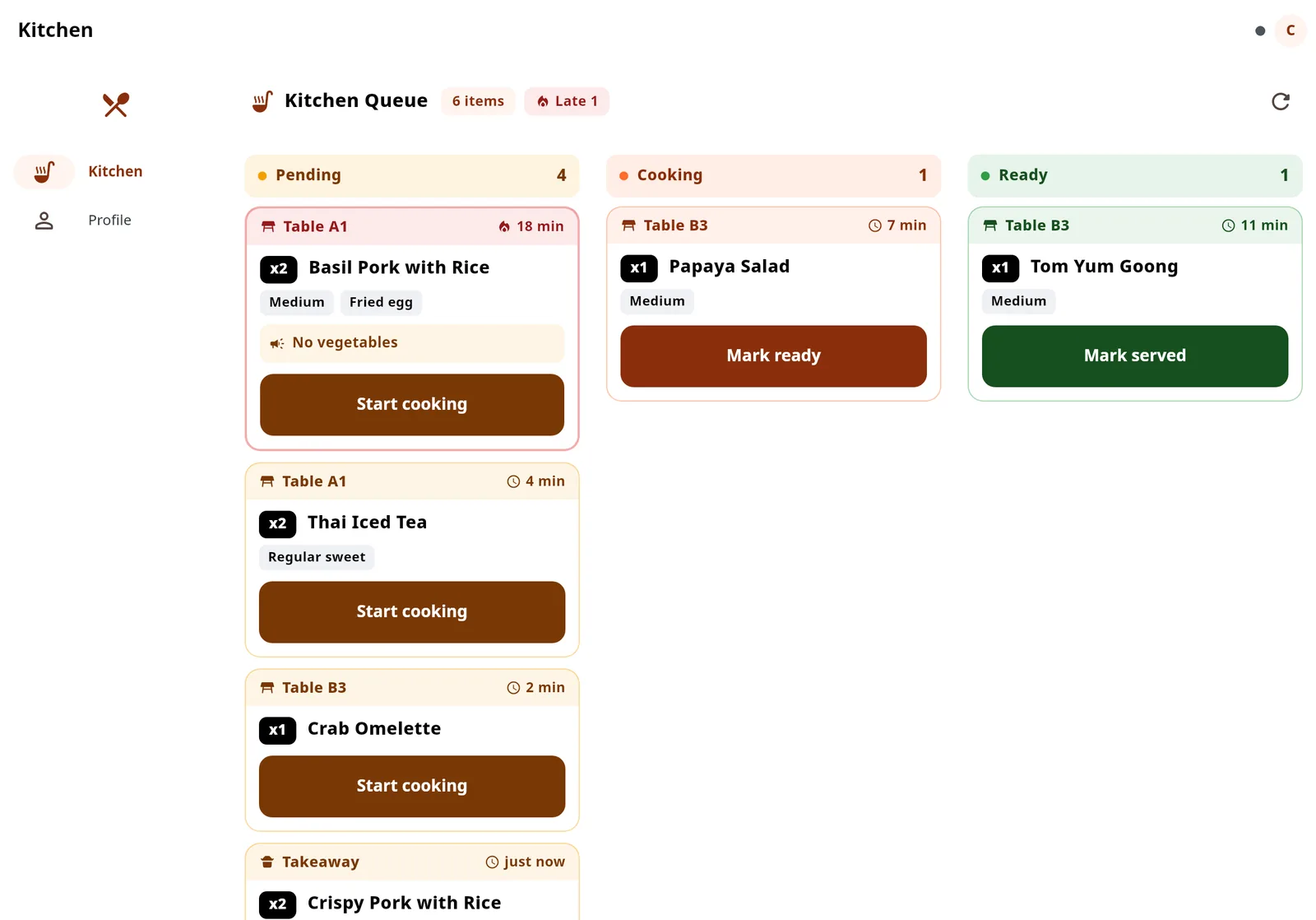
  • High-contrast modeKitchen status labels at 8.77:1 (WCAG AA asks for 4.5:1). Set it on the Profile screen; each device remembers it.
  • Big buttons for busy handsKitchen status buttons are almost twice the size of the phone ones.
  • Keeps taking orders offlineHeld on the device and synced when the network returns; the kitchen screen shows a full-width warning and polls for tickets every 30 seconds.
  • ไทย · English · 한국어Each device picks its language, and dish names follow it.
  • Phone, tablet and computer, one systemUse the devices you already own — no brand-specific hardware.

✓ Status labels at 8.77:1, readable in sunlight
Taste it in the demo
  1. Open the demo with any role and go to "Profile"
  2. Set "Screen contrast" to "High" and try switching language
Open the demo →
The kitchen screen in high-contrast mode, with darker buttons and labels
Kitchen screen in high-contrast mode
Chef's special

Ask about sales in a sentence, get answers from real shop data

Ask in Thai, English or Korean. The AI assistant (powered by Claude) calls tools wired to the shop database to fetch the numbers — it does not guess from the model's general knowledge.
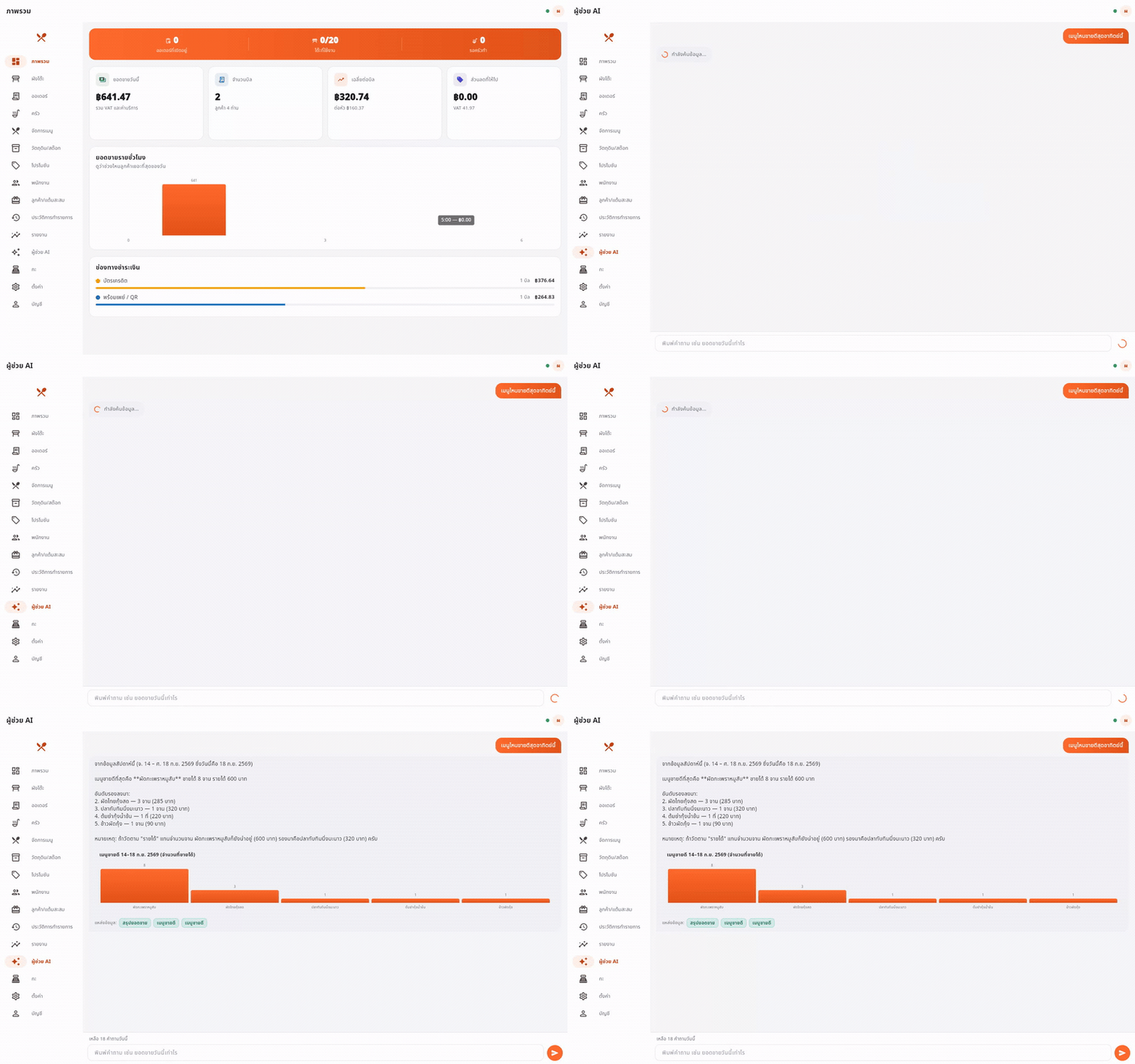
  • Every answer has a source. A "Sources" chip names the tool behind it, so it can be checked.
  • No data, no made-up numbers. It says so when a question falls outside what the system holds.
  • Owners and managers only. A daily question limit keeps the cost in check.
Animation of the AI assistant answering a sales question with a chart and source chips
Recorded once from real Claude API calls, in Thai. The web demo has the AI assistant switched off because it has no API key.
Back-of-house standards

Clean in the kitchen, not just out front

A system that handles money and customer data has to be checkable at every layer.

1,003 automated testsFrom pricing rules to the real app talking to the real server through a whole business day.

OWASP Top 10 reviewedSeven findings, all fixed, with safe defaults switched on.

Five rolesEnforced on the server. A disabled account or a role change takes effect at once.

Your data stays in your shopRuns on a machine in the restaurant; sales and customer data go to nobody's server.

Open source, Apache-2.0Use it commercially, change it and redistribute it.

Real screenshotsEvery screen on this page is captured from the app by golden tests, not mocked up.

Pricing

Your basket

Free to use, and no monthly plan will follow later — the system never ran on our servers in the first place.

🛒 Basket

Restaurant: yours · Branches: as many as you like

PaynEat POS · every feature on this pageApache License 2.0 · commercial use allowed
฿0.00
Monthly rentInstall once, run it in your own restaurant
฿0.00
Extra devices and branchesAdd as many phones and tablets as you need
฿0.00
Brand-specific hardwareUse the devices you already have
Not needed
VAT 7%
฿0.00
Total฿0.00
Pay ฿0.00 — open the demo →

Thank you for your order 🙏